LCD vs OLED vs Mini-LED: Which Display Is Right for Your Business?
LCD, OLED and Mini-LED compared for business use: brightness, contrast, burn-in risk, lifespan and cost, with picks for signage, offices and retail.

What pixel pitch means for LED video walls, how it sets viewing distance and resolution, SMD vs COB, indoor vs outdoor brightness, and what else to compare.
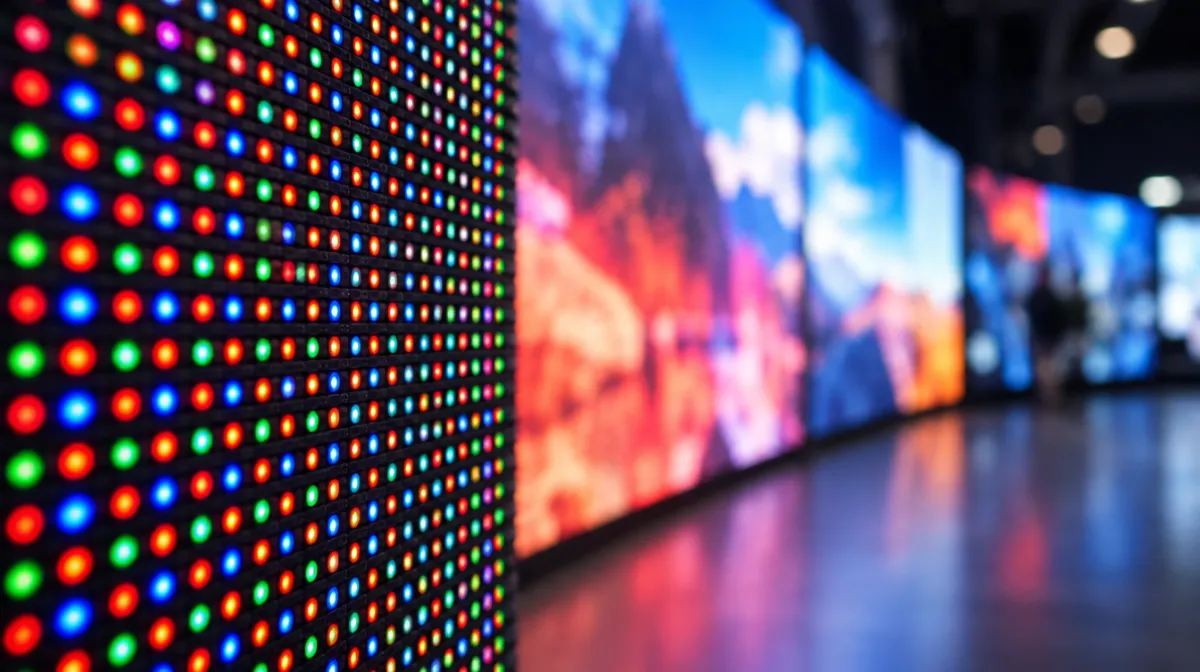
An LED video wall is built from modules of tiny red, green and blue LEDs that together form pixels. Pixel pitch is the distance, in millimetres, from the centre of one pixel to the centre of the next. It’s the single most important specification because it decides how sharp the wall looks up close, how many pixels it has and a large part of the price. A smaller pitch (such as P1.5) looks sharper at close range but costs more; a larger pitch (such as P4) suits audiences further away.
A widely used rule of thumb is that the minimum comfortable viewing distance in metres is about the same as the pixel pitch in millimetres. Many integrators suggest two to three times that distance for the best experience.
| Pixel pitch | Minimum viewing distance (rule of thumb) | Typical uses |
|---|---|---|
| Under 1.2 mm | About 1 m | Boardrooms, control rooms, broadcast studios |
| 1.5 to 1.9 mm | 1.5 to 2 m | Corporate lobbies, premium retail, meeting spaces |
| 2.5 to 3.9 mm | 2.5 to 4 m | Auditoriums, events, large retail and worship spaces |
| 4 to 6 mm | 4 to 6 m | Stages, large venues, some outdoor screens |
| 8 mm and above | 8 m or more | Outdoor billboards and stadiums |
These are guides, not rules. Content matters too: fine text and detailed graphics need a smaller pitch than bold video content.
Unlike LCD screens, an LED wall doesn’t have a fixed resolution. It depends on the wall’s size and pitch:
Pixels across = wall width in mm ÷ pixel pitch in mm
| Wall size (16:9) | Pitch | Resolution |
|---|---|---|
| 3 m × 1.69 m | 1.5625 mm | 1920 × 1080 (Full HD) |
| 3 m × 1.69 m | 2.5 mm | 1200 × 675 |
| 6 m × 3.38 m | 1.5625 mm | 3840 × 2160 (4K) |
| 6 m × 3.38 m | 3.125 mm | 1920 × 1080 |
This is why large, fine-pitch walls can reach 4K or more, while a small wall with a coarse pitch may have fewer pixels than a desktop monitor. Plan content at the wall’s actual pixel dimensions. Our guide to HD, 4K and 8K for business displays explains resolution for LCDs.
| Type | What it is | Strengths |
|---|---|---|
| SMD (surface-mounted device) | Each pixel is a small package with red, green and blue diodes | Mature, widely available, good value |
| COB (chip on board) | LED chips mounted directly on the board and sealed | More robust surface, better at very fine pitches, deeper blacks |
| GOB (glue on board) | SMD modules with a protective resin coating | Extra protection against knocks and moisture |
| MicroLED | Microscopic LEDs at very fine pitch | Premium image quality at close range |
Brightness is measured in nits (candela per square metre). Indoor LED walls typically run somewhere around 600 to 1,500 nits, often turned down in practice, while outdoor walls often need 5,000 nits or more to stay visible in daylight. Too bright indoors causes glare and wastes energy. Our guides to brightness in nits and outdoor digital signage go deeper.
| LED wall | LCD video wall | |
|---|---|---|
| Bezels | Seamless | Thin but visible seams |
| Brightness | Very high possible | Moderate to high |
| Close viewing | Needs fine pitch (expensive) | Sharp at close range |
| Sizes and shapes | Flexible, including curves | Fixed panel sizes |
| Cost at small sizes | Often higher | Often lower |
For many reception areas and control rooms, an LCD video wall is still the better value. Our video wall buying guide compares both in more detail.
If you’re building a business case, our guide to digital signage ROI helps you estimate returns.
Usually a fine pitch, around 1.2 mm or less, because people sit a few metres away and read detailed content.
It’s sharper, but it costs more and uses more LEDs. If viewers are far away, a larger pitch looks just as good for much less money.
Commercial LED walls are designed for long operating lives, but brightness gradually declines. Check the manufacturer’s rated lifetime, warranty and spare-parts policy.

Every article is edited by a human and checked against our editorial policy. Spotted a mistake? Tell us.
LCD, OLED and Mini-LED compared for business use: brightness, contrast, burn-in risk, lifespan and cost, with picks for signage, offices and retail.
How an LCD screen makes an image, layer by layer: backlight, polarizers, liquid crystals, transistors and color filters, plus TN, IPS and VA panels.
Nits explained for business screens: typical brightness for indoor, window-facing and outdoor displays, heat and sunlight challenges, and energy use.