LCD vs OLED vs Mini-LED: Which Display Is Right for Your Business?
LCD, OLED and Mini-LED compared for business use: brightness, contrast, burn-in risk, lifespan and cost, with picks for signage, offices and retail.

How an LCD screen makes an image, layer by layer: backlight, polarizers, liquid crystals, transistors and color filters, plus TN, IPS and VA panels.
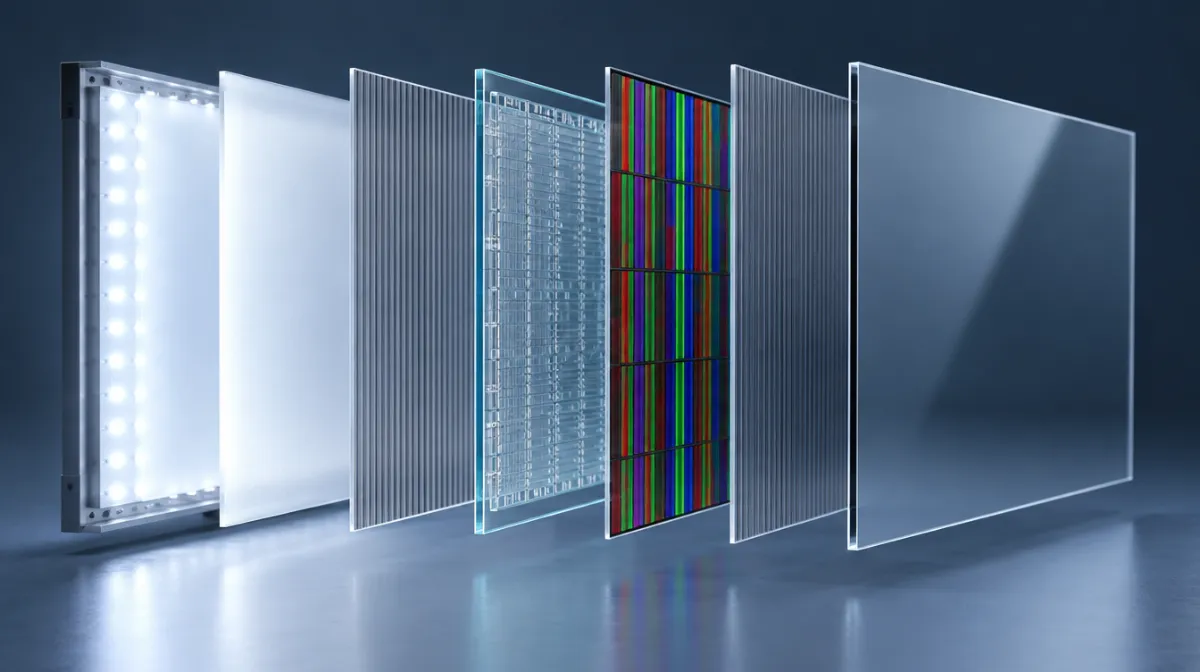
Liquid crystal displays are everywhere: phones, laptops, office monitors, TVs, cash registers and airport signs. Yet the way they work is clever and slightly counterintuitive, because an LCD doesn’t actually produce any light of its own. It controls light, one tiny pixel at a time.
From back to front, a typical LCD panel stacks these layers:
Light is a wave that can vibrate in many directions. A polarizing filter only lets through light vibrating in one direction. Place two polarizers at right angles to each other and almost no light gets through.
The same physics shows up in nature: light from a clear blue sky is partially polarized because of the way it scatters in the atmosphere. PhyClub’s explainer on why the sky is blue covers that scattering, and it’s why polarized sunglasses can make the sky look darker.
Liquid crystals flow like a liquid but keep an ordered, crystal-like alignment. Their key property is that they can rotate the polarization of light, and how much they rotate it changes when a voltage is applied.
Between the two crossed polarizers, the liquid crystals act as shutters:
Each pixel is made of three subpixels: red, green and blue. By controlling how much light passes through each color filter, the screen mixes millions of colors. From a normal viewing distance, your eye blends the subpixels into a single color.
Because the backlight is always on behind the panel, and liquid crystals can’t block light perfectly, some light leaks through even “black” pixels. That’s why LCD blacks can look slightly grey in a dark room, and why local dimming, used in Mini-LED screens, dims parts of the backlight to improve contrast. Our comparison of LCD, OLED and Mini-LED explains the trade-offs.
| Panel type | How the crystals move | Strengths | Weaknesses |
|---|---|---|---|
| TN (twisted nematic) | Twist and untwist | Fast response, low cost | Poor viewing angles and colour |
| IPS (in-plane switching) | Rotate parallel to the screen | Wide viewing angles, accurate colour | Lower contrast, can show “glow” |
| VA (vertical alignment) | Tilt from vertical | High contrast, deep blacks | Narrower angles than IPS, slower transitions |
For business displays viewed by many people from different angles, IPS is often preferred. For dimmer rooms where contrast matters, VA is a strong choice.
Refresh rate is how many times per second the image updates, measured in hertz (Hz). Response time is how quickly pixels change from one shade to another. Faster response reduces blur in moving images, which matters more for video and gaming than for menu boards.
Most modern LCDs use LEDs as their backlight, which is why they’re often sold as “LED TVs”. The image itself is still formed by the liquid crystal layer.
Permanent burn-in is rare on LCDs. Temporary image retention can happen but usually fades.
Viewing angle affects how light passes through the liquid crystals and polarizers. IPS panels minimize the effect.

Every article is edited by a human and checked against our editorial policy. Spotted a mistake? Tell us.
LCD, OLED and Mini-LED compared for business use: brightness, contrast, burn-in risk, lifespan and cost, with picks for signage, offices and retail.
Nits explained for business screens: typical brightness for indoor, window-facing and outdoor displays, heat and sunlight challenges, and energy use.
What OLED burn-in is, why static signage content is risky, how burn-in differs from image retention, prevention features and when OLED still makes sense.